Argle: Mastering the Bold Distressed Aesthetic Without Sacrificing Clarity
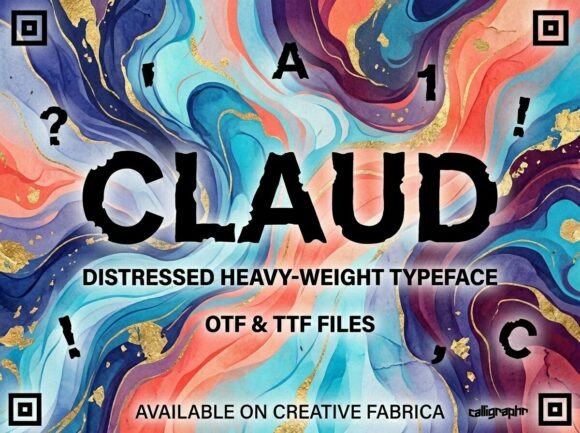
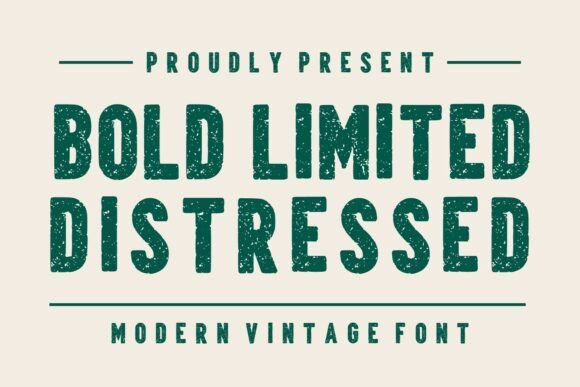
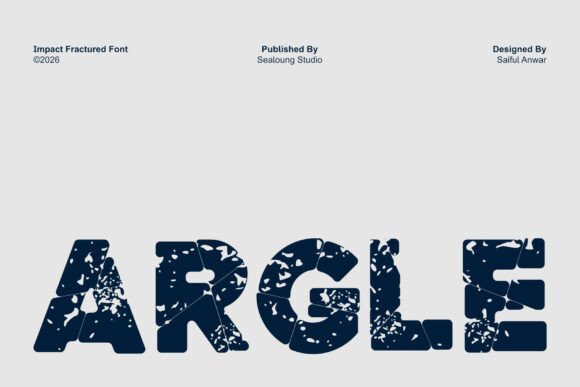
When a design project demands immediate visual authority and raw texture, Argle often emerges as a compelling solution. This bold distressed display font is engineered to convey strength through its cracked, broken textures and thick letterforms. It carries an industrial character that feels authentic rather than manufactured, making it a favorite for creators working on posters, album covers, game titles, and street-style branding. However, the very features that make Argle Fracture so visually striking are also what make it challenging to use effectively. The rugged aesthetic is not a universal fix; it requires intentional application to ensure your message remains powerful without becoming illegible or amateurish.
Many designers and marketers are drawn to the aggressive energy of Argle but stumble when integrating it into functional layouts. The distinction between a professional grunge aesthetic and a messy composition often lies in understanding the limitations of distressed typography. By addressing common pitfalls early, you can leverage the full impact of this typeface while maintaining high standards of readability and brand communication.
The Legibility Trap in Distressed Typography
The most frequent mistake when using Argle Fracture is prioritizing texture over comprehension. Because the font features significant cracking and rough edges, the negative space within each letterform is already compromised. When designers reduce the size of Argle to fit longer headlines or subheads, those intentional fractures close up, turning distinct characters into unrecognizable blobs of ink or pixels. This destroys the utility of the text and frustrates the viewer.
To avoid this, treat Argle strictly as a large-scale display tool. It is designed for headlines, logos, and short impactful phrases, never for body copy or secondary information. If you find yourself squinting to read the text at your intended print size or screen resolution, the font is too small. A practical test is to view your design at 50% zoom or from a distance of three feet. If the message isn't instantly clear, increase the point size or switch to a cleaner sans-serif for that specific element. Remember that the distressed details need physical or digital space to breathe; cramming them reduces their effectiveness and makes the design look cluttered rather than rugged.
Misjudging Background Contrast and Texture Interaction
Another overlooked detail involves how Argle interacts with complex backgrounds. Since the font itself contains significant internal texture and irregular edges, placing it over a busy photograph or a heavily textured surface creates visual vibration. The cracks in the letterforms compete with the grain or patterns in the background image, causing the text to vibrate optically and recede visually. This is particularly problematic in digital media where screen compression can further degrade the edge definition.
The corrective approach is to manage contrast deliberately. Argle performs best against solid, flat colors or areas of negative space that provide a stable canvas for its rough edges. If you must place it over an image, use a solid color overlay, a gradient mask, or a drop shadow specifically calibrated to separate the fractured edges from the background noise. Avoid using low-opacity settings on Argle; transparency exacerbates the legibility issues inherent in distressed fonts by allowing background elements to bleed through the cracks. Solid, opaque application ensures the industrial character reads as intentional design rather than printing error.
Evaluating Technical Quality Before Licensing
Not all distressed fonts are created equal, and assuming every version of Argle you encounter meets professional standards is a risky assumption. Low-quality versions of display fonts often suffer from poor vectorization, resulting in jagged curves that look pixelated even at large sizes, or inconsistent spacing that makes kerning a nightmare. Using a poorly digitized version of Argle will make your final output look cheap, regardless of your layout skills.
Before purchasing or downloading, always inspect the font file directly. Open it in your design software and type out a test string at a large size. Zoom in to 400% or higher to examine the curve quality and the cleanliness of the fracture points. High-quality versions of Argle will have smooth bezier curves even around the distressed edges, whereas inferior copies will show stair-stepping or unnecessary anchor points. Additionally, check the character set completeness. Professional projects often require specific punctuation, numbers, or accented characters. Discovering mid-project that the font lacks a stylized ampersand or necessary currency symbols can force an awkward redesign. Verify the licensing terms as well; some free or discounted versions restrict commercial use, which could create legal liabilities for client work or merchandise.
Balancing Rugged Fonts with Supporting Typefaces
A common error in branding and poster design is pairing Argle with other decorative or semi-distressed fonts in an attempt to amplify the gritty theme. This usually results in a chaotic hierarchy where nothing stands out because everything is screaming for attention. The power of Argle Fracture comes from its contrast against order, not its harmony with chaos.
For the most effective results, pair Argle with clean, geometric sans-serifs or neutral monospaced fonts. The stability of a supporting typeface like Helvetica, Inter, or Roboto Mono provides a structural grid that frames the organic irregularity of Argle. This juxtaposition enhances the perceived toughness of the display font while ensuring that essential information—dates, locations, pricing, calls to action—remains perfectly readable. Think of Argle as the lead vocalist and the supporting font as the rhythm section; the rhythm section shouldn't try to sing the solo. This balanced approach communicates professionalism and ensures your audience receives both the emotional impact and the factual content they need.
Contextual Appropriateness and Brand Safety
While Argle excels in industrial, survival, action, and cinematic contexts, applying it to inappropriate themes can send mixed signals. Using a fractured, aggressive display font for healthcare, financial services, children’s products, or luxury wellness brands can inadvertently communicate damage, instability, or neglect rather than strength. The semantic meaning of "broken" varies significantly across industries.
Always evaluate whether the distressed aesthetic aligns with your brand's core promise before committing to Argle. For a mechanic shop or a heavy metal band, the fractures imply durability and authenticity. For a daycare center or an investment firm, they imply risk and disrepair. If you are unsure, test the font in a mockup alongside your existing brand assets and gather feedback from people outside your immediate creative bubble. Ask them what emotion the combination evokes. If the response leans toward "damaged" rather than "bold," reconsider your typographic choice. Successful use of Argle requires confidence that the rugged texture supports, rather than undermines, your strategic message.
Ultimately, Argle Fracture is a specialized tool that rewards thoughtful application. By respecting its legibility constraints, ensuring technical quality, managing background relationships, and verifying contextual fit, you transform it from a mere novelty into a powerful asset for visual storytelling. The goal is not just to use a cool font, but to communicate with precision and impact.